The SPF 10 lookup limit is a hard evaluation cap in IETF RFC 7208 — Sender Policy Framework (SPF): a receiver will perform at most ten DNS-looking mechanism checks while deciding whether your sending hop is authorized. include, a, mx, ptr, exists, and redirect count, including nested includes. After ten, the result is permerror, not a polite fail. Small businesses hit it by stacking Google, Microsoft, a form host, an ESP, and a forwarder include in one record—or worse, in two records. Spend lookups on hops that actually AUTH as the domain. Inbound forwarding does not list the internet.
Quick answer for the SPF 10 lookup limit
Publish exactly one v=spf1 string at the name you send as. Put every hop that may send in that string. Count lookups the way a receiver will: each include costs at least one, then every DNS-looking mechanism inside that include. Flattening to raw ip4 can dodge the cap and then break when the vendor changes addresses. Copy MailerZ sending values from the dashboard when you use paid send-as. Do not invent an include from a blog.
Duplicate records are a different article: how to check SPF without creating duplicate records. This page is the ten-lookup budget. Softfail after a forward is another page. Do not merge those tickets.
MailerZ Free is inbound-only: one domain, ten aliases, 14-day store, send-as off, SMTP off, API off. You do not need a production SPF record to receive. Paid plans add send-as. Solo is $40 per year: 5 domains, 25 aliases, 2,500 outgoing, 20 per hour. Starter is $8 or $80. Business is $19 or $190. Agency is $39 or $390. Unlimited is $99 or $990, 180-day store, 100,000 outgoing. Confirm MailerZ pricing. Limits are not an inbox SLA.
Outbound identity lives on send and reply. DNS cutovers live on email forwarding. People-first evidence, not a ranking: Creating helpful, reliable, people-first content.
The user problem and the decision criteria
The symptom is outbound permerror or intermittent fail after a wizard “added SPF.” Authentication-Results says spf=permerror. Gmail still accepted a probe last week. A customer’s bank did not. Someone pastes a second v=spf1 because the form host said add TXT. Someone else adds include:_spf.google.com and include:spf.protection.outlook.com “during migration.” Nested lookups quietly spend the budget. The tenth check is a vendor you forgot you still pay.
| Question | If yes | If no |
|---|---|---|
| Do you send as the domain? | You need one SPF string and a lookup count you can explain. | Inbound-only. Do not publish leftover suite includes. |
| How many hops AUTH as this From? | Each include must earn its keep. Name the hop. | If you cannot name it, delete the include. |
| Is there already one v=spf1? | Merge new mechanisms into it. Count lookups after the merge. | Create one. Never a second record. |
| Did a wizard add mx or ptr? | Those cost lookups. Prefer dashboard values and ip4/ip6 when the vendor publishes them. | Good. Do not add them for folklore. |
| Are you flattening includes by hand? | Document the refresh job. Vendor IPs move. | Includes stay, but the nested count still applies. |
The ten-lookup rule is a poor thing to “solve” by buying a mailbox seat. It is a good thing to solve by naming the hop that sends and deleting the rest. If you need Workspace Calendar, buy Workspace. Do not keep its include after you stopped sending through Google.
What counts as a lookup
IETF RFC 7208 — Sender Policy Framework (SPF) section 4.6.4 is the cap. A receiver evaluating your policy performs DNS queries for certain mechanisms. The mechanisms that cause those queries are include, a, mx, ptr, exists, and the redirect modifier. Nested policies reached through include or redirect share the same ten. There is also a void-lookup limit: too many names that return no data can fail the check even before you hit ten successful answers.
Mechanisms that do not count toward ten
ip4 and ip6 compare the connecting address to a literal. No extra DNS. all is the terminal qualifier. exp is an explanation modifier and is not a substitute for authorization. A record made of dashboard-provided ip4 ranges plus one include can be cheap. A record full of mx and a on names that themselves have many A records is expensive.
Why mx and a are spendy
mx looks up the MX set, then the A or AAAA of each exchanger. Each of those DNS-looking steps counts. A domain with several MX hosts can burn a surprising share of the budget on one mechanism. a looks up addresses for a name. If you write a without a name, it uses the current domain. That is rarely what a small business meant when they wanted to authorize a website host.
ptr is a trap
ptr does reverse DNS and then forward confirmation. The RFC discourages it. It is slow, fragile, and expensive in lookups. Do not add ptr because a 2012 blog said it “matches the hostname.” Delete it if a wizard left it there.
Inbound forwarding is not an include list
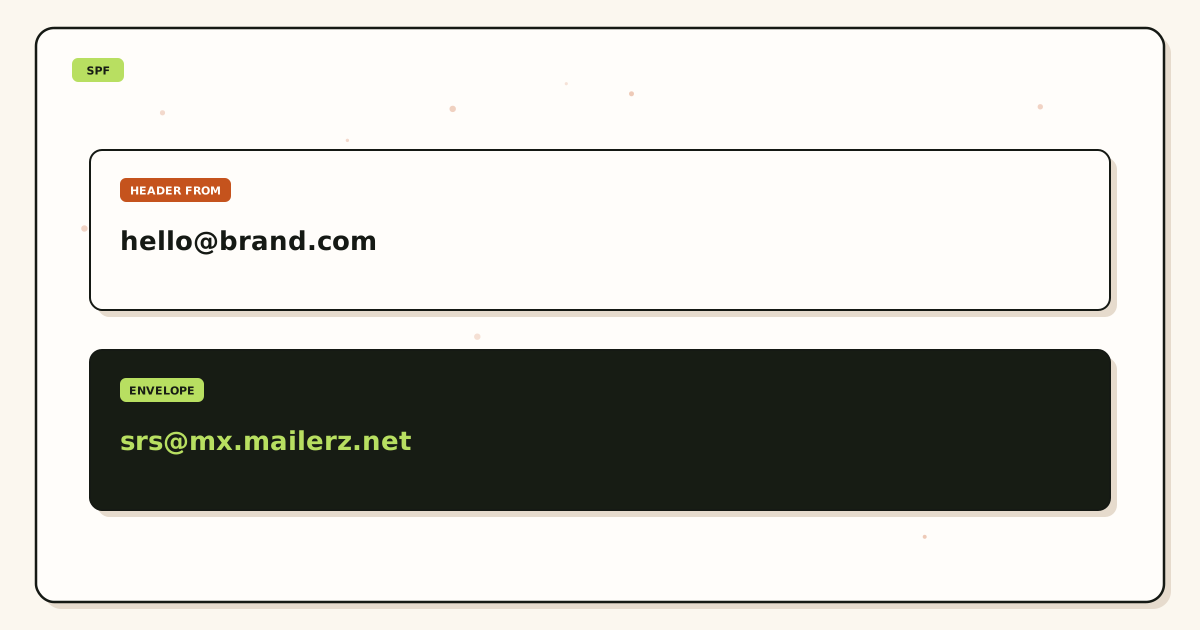
When MailerZ forwards a bank invoice to Gmail, the bank’s SPF is evaluated at MailerZ’s inbound edge, then the forward uses envelope SRS. Your domain’s SPF is not supposed to authorize the bank. Adding every vendor who might write to you is how people invent twenty includes. That is not authentication. That is folklore. Header From stays the bank. DKIM, if the bank signed and the body was not mutated, is what destinations use for DMARC on forwarded mail. See DMARC and forwarding for alignment. This page stays on the ten-lookup budget for mail you send.
IETF RFC 6376 — DomainKeys Identified Mail (DKIM) and IETF RFC 7489 — Domain-based Message Authentication, Reporting, and Conformance (DMARC) do not raise the SPF cap. DKIM is a signature. DMARC chooses a policy when SPF or DKIM align. A permerror on SPF can still leave DKIM as the path that saves DMARC—if DKIM passed and aligned. Do not treat a green DKIM as permission to ignore a permerror you can fix in DNS.
How to stay under ten
This is the SPF 10 lookup limit setup path. Count like a receiver, then send like a stranger.
List hops that actually send as the domain
Paid MailerZ SMTP if you use it. Gmail Send mail as through Google if you still do. A form host if the form still sends through that host. An ESP if campaigns use the same From. If a hop does not AUTH as this From, it does not belong in SPF.
Look up the public TXT set
Count strings that start with
v=spf1. If there are two, stop and merge. The lookup limit does not matter until you have one record. Use a public resolver, not only the registrar list view.Expand includes on paper
For each
include, fetch that name’s SPF and count its DNS-looking mechanisms. Add them to your running total. Vendor records change. Recheck after they publish a notice, not only after an outage.Delete leftover suite includes
If you left Google Workspace, remove
include:_spf.google.comunless Gmail Send mail as still sends through Google. If you left Microsoft 365, remove the Outlook include unless that hop still sends. Leftover includes are how you hit ten without sending through those clouds.Copy MailerZ values from the dashboard
Paid send-as shows the exact mechanisms to add. Paste them into the same string. Do not add a second TXT. Do not guess a hostname from this article. Free has no send-as; an SPF record on Free does not unlock SMTP.
Prefer ip4/ip6 when the vendor documents stable ranges
Literals are cheap. They go stale if you never refresh. Includes stay current and cost lookups. Pick the tradeoff on purpose. Do not flatten a vendor who tells you not to flatten.
Remove ptr, stray mx, and exists toys
Unless you can explain the query in one sentence, delete it.
existsis for specialized policies. Small-business records almost never need it.Prove outbound from a third mailbox
Unique subject. Read Authentication-Results.
spf=permerrormeans you still have a budget or duplicate-record problem. Self-send from the same Gmail can hide it. Leftover MX is a separate inbound proof.
Failure modes and proof
Most “SPF is broken” tickets after a forwarding cutover are leftover includes, a second v=spf1, or a wizard that added mx plus three vendor includes. Separate permerror from fail from softfail before you flatten anything.
| What you see | Likely cause | Proof to collect |
|---|---|---|
| spf=permerror | More than ten DNS-looking checks, two records, or a void-lookup storm. | Public TXT count. Expanded include tree. Nested totals. |
| spf=fail, one hop | That hop is not in the string. | Which host AUTHed. Add that hop’s dashboard include, not a second record. |
| spf=softfail on a forward | Destination evaluated the forwarder envelope. Different article. | Do not add the world’s banks to your SPF. |
| Outbound 550 from MailerZ | Unauthorized From, Free plan, or open-relay refusal. | SPF did not cause a 550 on send. Plan and AUTH did. |
| Green checker, customer fail | Checker did not expand nested includes the same way, or you tested the wrong name. | Evaluate the exact From domain and subdomain you send as. |
| Flattened last year, fail now | Vendor IPs moved. | Refresh literals or return to the vendor include and re-count. |
Proof is the public record, the expanded tree, and Authentication-Results from a third mailbox. Do not send SMTP passwords. Tools hub: tools. Diagnostics: troubleshooting.
MailerZ workflow and product boundary
MailerZ is a custom-domain delivery layer operated by Secuno LLC. Inbound MX plus, on paid plans, authenticated SMTP. Envelope SRS only. Header From, Subject, Date, Message-ID, body, and MIME are never rewritten. Not Google Workspace. Not an open relay. Not SOC 2.
Inbound: you do not spend your SPF budget authorizing senders who write to you. Outbound: you spend the budget on the hop that AUTHs. Copy the dashboard. Unauthorized or unhosted send is 550 / 550 5.7.1.
What MailerZ does
- Accept inbound mail for verified domains and configured recipients.
- Preserve Header From on the forward.
- Show paid sending DNS values in the dashboard when send-as is on.
- Store hops 14 / 90 / 180 days by plan.
- Refuse open relay.
What MailerZ does not do
- Raise RFC 7208’s ten-lookup cap. No vendor can.
- Merge two
v=spf1records for you if a wizard published a second one. - Promise inbox placement because SPF passed.
- Offer send-as on Free.
- Claim SOC 2, ISO 27001, or HIPAA. Controls: Security.
Cost, alternatives, and trade-offs
The lookup limit is free to obey and expensive to ignore. You do not buy your way past ten. You buy send-as when you need a From identity. Free remains inbound. Solo is $40 per year when SMTP and 25 aliases travel together. Confirm pricing.
| Approach | You get | You give up |
|---|---|---|
| One include per live hop | Vendor IPs stay current. | Nested counts. You must re-expand after vendor changes. |
| Flatten to ip4/ip6 | Cheap on the ten-lookup budget. | A refresh job. Silent fail when ranges move. |
| Keep Google and Microsoft includes forever | Nothing useful if those hops are dead. | Budget you need for the hop you actually use. |
| Second v=spf1 from a wizard | A false sense of backup. | Permerror. Merge instead. |
| Suite seat to “fix SPF” | Calendar, if you wanted Calendar. | Money. The cap is still ten. Google Workspace — product overview |
Paid MailerZ outgoing caps are 2,500 / 5,000 / 12,000 / 20,000 / 100,000 per month and 20 / 40 / 60 / 60 / 300 per hour. Hitting a cap is 550, not permerror. Do not flatten SPF to chase a plan limit.
Worked scenarios
Website form still on a host include, plus leftover Google, plus MailerZ paid SMTP. Three includes. Google’s record itself uses more includes. The total crosses ten. Delete Google if Send mail as now uses MailerZ SMTP. Keep the form include only if the form still sends through that host. If the form now uses MailerZ SMTP, delete the form include too.
Subdomain mail.example.com has its own SPF. You send as example.com. The checker that passed on the subdomain did not evaluate the apex. Publish and count the name in Header From. SPF does not walk up the tree for you the way DMARC organizational alignment can.
Agency with twenty client zones. Each zone gets the dashboard include for that brand’s send-as, not a shared mega-record copied from another client. A client who still sends campaigns through an ESP needs that ESP include on that zone only. Do not paste the agency’s own includes onto a client domain.
Inbound-only Free domain. Someone published SPF with mx and two suite includes “to be safe.” Receivers who check SPF on mail that was never sent as you still see a bloated policy. Delete it or replace it with a tight record only when you start sending. Safety is not a pile of includes.
Flattened ESP ranges in January. March campaign fails. The ESP added a new subnet and told customers who flatten to refresh. Your include-based neighbors were fine. Put the refresh on a calendar or stop flattening.
Two TXT records: old Google SPF and new MailerZ paste. Permerror before anyone counts to ten. Merge, then count. The duplicate-record article is the first stop. This article is the second.
redirect= to a corporate parent policy that already has eight includes. Your one redirect can spend the rest of the budget. Expand the parent before you point at it. A pretty “we inherit IT’s SPF” slide is how a brand domain permerrors on Friday.
Practice and anti-patterns
Practice: one v=spf1. Anti-pattern: a wizard TXT per vendor.
Practice: name the hop that AUTHs. Anti-pattern: include every logo in the footer.
Practice: expand nested includes on paper after every vendor change. Anti-pattern: trust a green web checker that does not recurse.
Practice: delete leftover Google and Microsoft includes when those hops die. Anti-pattern: “keep them during migration” for a year.
Practice: copy MailerZ dashboard values. Anti-pattern: invent include: hostnames from a blog.
Practice: prove outbound on a third mailbox. Anti-pattern: self-send as the gate.
Practice: inbound forwards stay out of your SPF. Anti-pattern: authorize the world’s banks so forwarded invoices “pass SPF.”
Practice: treat permerror as a DNS budget bug. Anti-pattern: buy a mailbox seat to wash it away.
ptr stays deleted. exists stays unused unless you have a written reason. mx stays unused unless you can count the exchangers and still have budget. ~all versus -all is a policy choice after the record evaluates. A permerror never reaches a useful all.
Review quarterly, or sooner when a form host, ESP, or Google Workspace status changes. Write the include tree next to domain renewals. The junior who pastes a second TXT should meet a runbook that says merge, then count, then send.
DKIM still matters. A clean SPF with a broken body mutation will fail DMARC on alignment even if lookups are three. Do not spend a week flattening to fix a footer that broke the signature. The ten-lookup limit is one layer. Keep it boring so you can see the others.
Subdomains need their own count. SPF on example.com does not authorize mail.example.com unless you said so. A checker that passed the apex does not bless a campaign From on a subdomain. Expand the record that matches Header From. Then send to a third mailbox. Then read Authentication-Results out loud: spf, smtp.mailfrom, dkim, dmarc. If you cannot, you do not have a lookup-limit ticket yet.
Website builders love to append an include when you connect a form. If the form now uses MailerZ SMTP, that leftover include is budget you are spending on a dead hop. If Gmail Send mail as still sends through Google, you may still need Google’s include. Name the hop that AUTHs. One hop’s include. Confirm pricing only after inbound MX is exclusive. An SPF record on Free does not unlock send-as.
How to count lookups out loud
Start at one for each include, a, mx, ptr, exists, and redirect on your record. Then open each include and add its DNS-looking mechanisms. Stop at ten. If you cannot finish the tree, you already have an operational problem. ip4 and ip6 stay free. Two v=spf1 records abort the count: merge first. Then send a unique paid-SMTP message to a third mailbox and read Authentication-Results. A green web checker that does not recurse is not a count.
FAQ
What is the SPF 10 lookup limit?
RFC 7208 limits how many DNS-looking mechanisms a receiver will evaluate in one SPF check. include, a, mx, ptr, exists, and redirect count, including nested includes. After ten, evaluation stops with permerror. ip4, ip6, and all do not count. One v=spf1 string. Copy sending values from the dashboard. Do not invent includes.
Does this require a new mailbox?
No. The lookup limit is a DNS evaluation rule. MailerZ is not IMAP. Gmail or Outlook stays the store. A new suite seat does not raise the ten-lookup cap.
Will it work with Gmail or Outlook?
Yes as destinations. SPF is checked by receivers of mail you send, not by inbound forwarding’s Header From. Self-send can hide a permerror. Prove outbound to a third mailbox after you merge includes.
What DNS records are involved?
Exactly one SPF TXT at the name you send as. DKIM and DMARC as the dashboard shows if you send. Verification TXT is a different string. MX is inbound and does not replace SPF. Two v=spf1 records are a different bug.
Do inbound forwards count against my SPF lookup limit?
No. Inbound forwarding does not require you to authorize the internet in your SPF. Spend lookups on hops that AUTH as your domain. MailerZ inbound uses envelope SRS and does not rewrite Header From. Do not paste every vendor include “just in case.”
What should I test before production?
Public TXT lookup showing one v=spf1. Count DNS-looking mechanisms, including nested includes. Then send a unique paid-SMTP message to a third mailbox and read Authentication-Results. If you are inbound-only on Free, you may not need SPF yet.
Key takeaways
- The SPF 10 lookup limit is RFC 7208. include, a, mx, ptr, exists, and redirect count, including nests.
- ip4, ip6, and all do not count. ptr is a trap. Delete it.
- One v=spf1 string. A second record is permerror before you finish counting.
- Inbound forwarding does not list the internet in your SPF.
- Spend lookups on hops that AUTH as the domain. Delete leftover suite includes.
- Copy MailerZ sending values from the dashboard. Do not invent includes.
- Free has no send-as. SPF on Free does not unlock SMTP.
- Not IMAP, not an inbox SLA, not SOC 2. Confirm live pricing.
Conclusion and next action
Stay under the SPF 10 lookup limit by publishing one record, naming every hop that sends, expanding nested includes, and deleting leftovers. Inbound mail does not belong in that string. Paid send-as does. Copy the dashboard. Prove outbound from a third mailbox. MailerZ will not raise the RFC cap and will not promise Primary because SPF passed.
Next action: look up the public TXT, count v=spf1, expand includes, and send a unique message as the domain if send-as is in scope. Start free if you only need inbound. Add SPF when you pay for SMTP.
Need send-as without a permerror
Start free on inbound, then paste dashboard SPF into one record.
One string. Count lookups. Sign in if the domain is already there.
Review quarterly, or sooner if vendor SPF includes, flattening guidance, or MailerZ sending DNS changes. Author: MailerZ editorial, Secuno LLC.