Namecheap MX records should name one inbound owner. Mixed Private Email, parking, Google, and MailerZ rows are leftover MX. Senders pick one host. You get random delivery. Priority is not load-balancing. Delete extras. Two resolvers. Filename the zone. Re-query after the email tile republishes what you just cleaned.
Treat every extra hostname family as a hard stop, the same way leftover MX troubleshooting treats a Google row beside MailerZ. Config parallel—building aliases while the old family stays exclusive—is safe. Dual families live is not. If the client still pays for Private Email, unused that product or accept that you do not own inbound yet. Tools can show the split. They cannot delete the row. Morning re-query is how you catch a tile that rewrote the zone while you slept. Foreign probes from a mailbox that is not the destination are how you prove the family you kept actually receives the printed strings. Self-send will lie. Agency pricing does not merge leftovers. Confirm live cards. No inbox SLA. Not SOC 2.
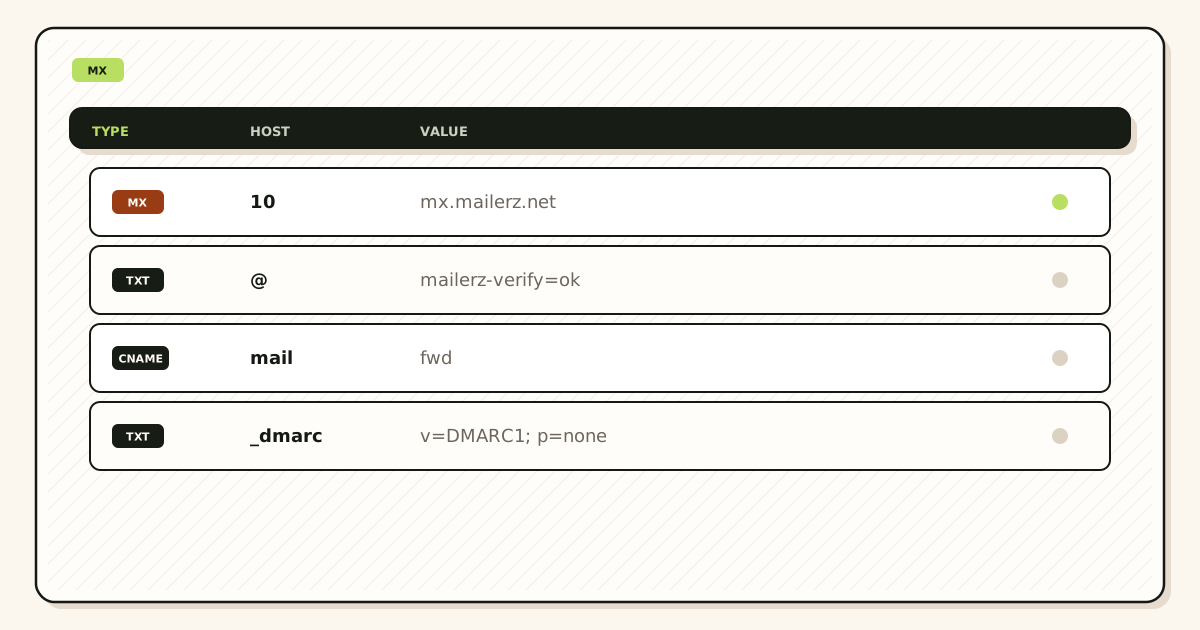
Quick answer for namecheap mx records
Copy MailerZ MX from the dashboard. Remove every other MX in Advanced DNS. Product path: docs, tools, troubleshooting, migration planner. IETF RFC 5321 — Simple Mail Transfer Protocol. Research: Domain Connect (nofollow)—helpers paste, they do not police leftovers.
Confirm pricing. Free 1/3/HOLD/no send-as. Solo $40/yr. Starter $8/$80. Business $19/$190. Agency $39/$390. No inbox SLA. Not SOC 2.
People-first MX pages show the listing, not a vibe.
The user problem and the decision criteria
“We’ll keep Google as backup” is leftover MX with a story. “We’ll keep Private Email until MailerZ looks good” is leftover MX with a calendar. Mixed providers are not a hybrid. They are two answers to “who owns inbound.”
| Question | If yes | If no |
|---|---|---|
| More than one MX hostname family? | Leftover MX. Stop the cut story. | You can probe. |
| Parking or null leftovers? | Delete. Parking is an owner. | Good. |
| Lower priority Google row “just in case”? | Still leftover. | Good. |
| NS mismatch? | Theater. Fix NS first. | Edit Advanced DNS. |
Write the single owner on the ticket before anyone pastes a screenshot. If two families still appear after the paste, the cut is not done. Delete extras. Query again. Then probe.
Technical mail flow
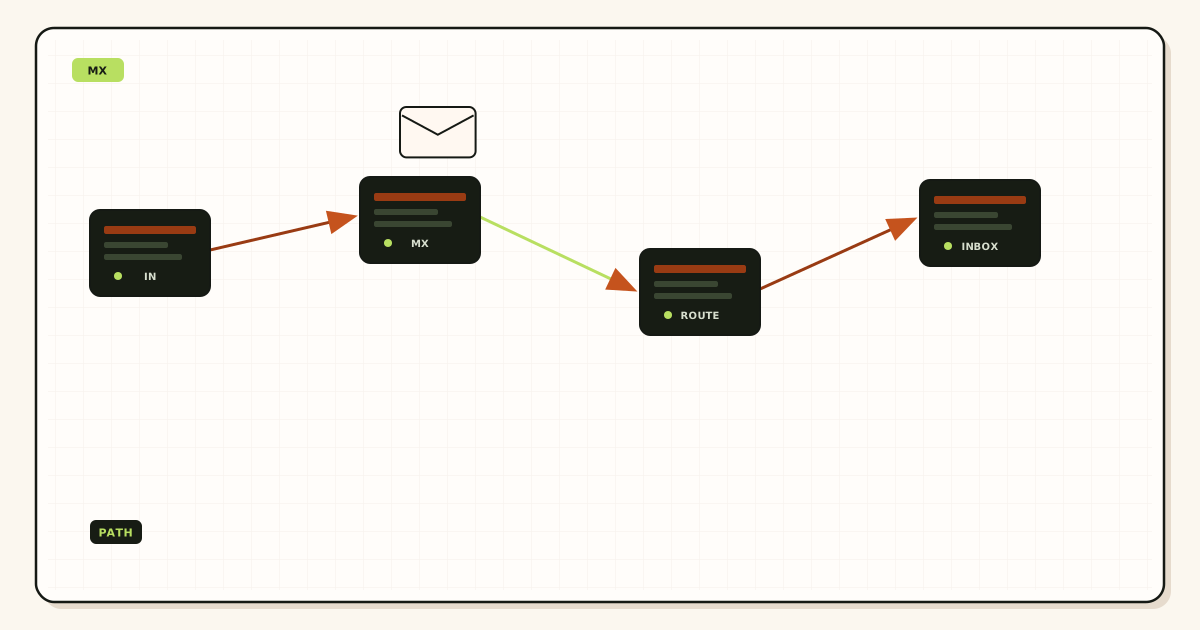
A sender sorts MX by preference and tries hosts. If MailerZ and Google both appear, some mail never reaches your maps. That looks like “random Gmail.” It is random MX selection. IETF RFC 5321 — Simple Mail Transfer Protocol does not merge providers because you wanted a safety net.

Self-send from Gmail to the alias can skip the public MX path. Foreign probes cannot. Use them.
Step-by-step setup and decision path
List every MX on two resolvers
Write hostnames. Circle families: MailerZ, Google, Microsoft, Namecheap, parking.
Decide the single owner
If the owner is MailerZ, the others go. If the owner is Workspace, do not add MailerZ MX.
Delete leftovers in Advanced DNS
Filename the before and after with the zone and date.
Disable the email product that rewrites MX
Otherwise Monday brings the leftovers back.
Foreign-probe printed aliases
History 250. Destination search.
Re-query after registrar saves
Same as the Namecheap DNS setup article. This page is the leftover specifically.
Failure modes and proof
| What you see | Likely cause | Proof |
|---|---|---|
| Some mail in old Private Email | Leftover MX | Resolver listing |
| Works for you, fails for customers | Self-send | Foreign probe |
| Leftovers after a click | Email tile republish | Monday re-query |
| Panel clean, world mixed | Theater NS or cache | Second resolver + NS |
| 250 empty | Maps or HOLD | Recovery |
Proof is an exclusive listing, not a story about backup. IPv6 after exclusive names exist is a host ticket.
MailerZ workflow and product boundary
We accept mail when we are the MX owner and the alias exists. We do not load-balance with Google. Envelope SRS. Header From untouched. Not IMAP. Not an open relay. 550 5.7.1 on unhosted send.
Free 1/3/14-day/HOLD/no send-as. Solo $40/yr. Starter $8/$80. Business $19/$190. Agency $39/$390. Confirm /pricing. No SOC 2. No inbox SLA.
Cost, alternatives, and trade-offs
| Choice | What you get | What you give up |
|---|---|---|
| Exclusive MailerZ | One hop to recover | The backup story |
| Exclusive Workspace | A suite. Quote live | This hop |
| Mixed | Random delivery | A ticket you can close |
Paying two email products on one zone is two invoices for one split. Delete one owner.
What mixed looks like
Typical Namecheap leftovers: mx1/mx2 Private Email, registrar forwarding hosts, parking MX, aspmx.l.google.com beside MailerZ, an old cPanel host. Any second family is leftover. “Low priority” does not sanitize it.
Hosting “email routing” toggles that republish local MX are the same class. Turn them off when MailerZ owns inbound.
Priority is not load-balancing
Preference numbers order attempts. They do not split load fairly. They do not keep Google warm. They do not make dual MX a migration strategy. Config parallel (maps while old MX stays exclusive) is safe. Dual MX is not. See leftover MX and MX priority articles for the general case. This page is the Namecheap flavor.
Proof that is exclusive
Two resolvers. Same MailerZ hosts. No other families. Zone-named screenshot. Foreign probe. Re-query after saves. Two-factor on destinations. HOLD review. Night operators who add a backup row undo the article.
If a second operator needs the order, send this page plus the Namecheap DNS setup article. One owner. Delete extras. Probe. Re-query.
The artifacts that close Namecheap MX records are exclusive listings and probes. Everything else is mixed providers with a narrative.
How to read an MX family
An MX family is a set of hostnames that belong to one product. MailerZ hosts are one family. aspmx.l.google.com and the Google alt rows are one family. Outlook protection hosts are one family. Namecheap Private Email mx1/mx2 style names are one family. Parking or forwarding hosts the registrar invented are another. If two families appear in one answer, senders will pick. You will call it random. It is leftover MX.
Write the families on the ticket before you delete. Circle them on the resolver output. Filename the before screenshot with the zone and the date. After delete, the after screenshot should show one family. If a tool still shows two, you edited a theater panel or TTL has not drained on that resolver. Query a second resolver. Do not add the old family back “until TTL.” Dual MX during TTL is still dual MX.
Priority numbers inside one family are preference. Priority numbers across two families are a bake-off. IETF RFC 5321 — Simple Mail Transfer Protocol does not load-balance your feelings. A low-priority Google row still receives mail when MailerZ is slow, filtered, or when the sender’s software tries the next host. That is the split.
Null MX is an explicit “this name does not receive mail.” Parking MX that accepts and blackholes is not null MX. It is an owner that eats messages. Delete it if MailerZ should own inbound. Do not invent null MX to pause a cut unless you mean to reject everything.
Namecheap tiles that rewrite MX
The email product, website builder, and parking flows are merchants that write zone files. Operators finish Advanced DNS, then someone clicks a tile on Saturday. Monday the old family is back. That is not DNS physics failing. That is a rewrite. Re-query after every Namecheap save that smells like email or website. Write the date on the sheet.
Disable or unused the email product if MailerZ owns inbound. Leaving it “subscribed but not used” is how the tile stays one click away. Confirm with the client who pays the Private Email invoice. Two invoices plus two MX families is the expensive version of leftover MX.
Domain Connect and similar helpers can paste MailerZ MX quickly. They do not police leftovers. Domain Connect explainers are research. After a helper runs, still list families. Still delete extras. Still query two resolvers.
If NS are not Namecheap, the tile you clicked did not change the public zone. You now have a clean theater panel and a dirty real zone. Confirm NS. Edit the real host. The Namecheap DNS setup article is the panel walkthrough. This page is the mixed-family stop.
Why backup MX is leftover MX
“We’ll keep Google as backup” sounds like reliability. It is a second owner. Some senders will deliver there forever. Those messages will not hit your MailerZ maps, history, or HOLD. Recovery cannot replay what we never accepted. The backup story creates the empty-history ticket.
Config parallel is maps while old MX stays exclusive. That is safe. Dual MX is both families live. That is leftover. Do not rename dual MX to hybrid, coexistence, or safety net. Those words do not change the resolver listing.
If the client still needs Workspace, do not add MailerZ MX. Quote Google live. Stay exclusive to the suite. MailerZ on the same zone is leftover MX with an extra invoice. The standard applies only to zones you actually own as the inbound hop.
Cutting without a Friday surprise
Build aliases first. Verify TXT first. Cut one zone. Two resolvers. Foreign probe every printed string. Unique subjects. History 250. Destination search. Morning re-query. Self-send is not the gate. Launch-day monitoring is the checklist article. This page adds: if any second family remains, the launch is not green.
Rollback is exclusive old or exclusive new. Rollback is never mixed. The dated exclusive screenshot is the file you restore if a tile republishes. Last month’s screenshot from another client is how you paste the wrong family.
Free is one domain and ten aliases, HOLD, no send-as. Solo is forty dollars a year. Starter eight or eighty. Business nineteen or one hundred ninety. Agency thirty-nine or three hundred ninety. Confirm pricing. A mixed MX cut does not get cheaper because you bought Agency. Caps are not an inbox SLA. Not SOC 2.
Agencies and ten Namecheap panels
Night operators paste MX screenshots across clients because the panels look alike. Filename every file with the zone. One client can be exclusive MailerZ while the next still has Private Email. Do not report “the fleet is green.” Report the zone you listed.
Shared SMTP is a different article. Mixed MX is inbound. Do not mix 550 5.7.1 into a leftover-MX thread. Two-factor on destinations. HOLD review after the cut. IPv6 after exclusive names exist is a host ticket.
Offboard a client by leaving exclusive new MX they chose—or a written accept of bounce—not MailerZ beside their new Google. Your hostname in their leftover set is still leftover MX with your brand in the split.
If a second operator needs the order, send this page plus the Namecheap DNS setup article and leftover MX troubleshooting. One family. Delete extras. Two resolvers. Probe. Re-query after tiles.
The artifacts that close Namecheap MX records are a single family on two resolvers and foreign probes. Everything else is mixed providers you decided to keep.
What a lookup must show
A public MX lookup is not a Namecheap screenshot. Ask two independent resolvers for the apex MX. Write every hostname. Group them into families. If more than one family exists, the cut is not done. Tools on tools help you see listings. They do not delete rows. You still open Advanced DNS—or the real NS host—and remove extras.
Some senders cache. TTL does not excuse a mixed listing you left published. Dual MX at TTL 60 is still dual MX. Config parallel remains the safe pattern: maps first, exclusive cut second, probe third.
Self-send from Gmail to the alias can succeed while a customer on Outlook still hits Private Email. Foreign probes from a mailbox that is not the destination are the inbound gate. Unique subjects. History 250. Destination search. Empty history plus a mixed listing is leftover MX, not a MailerZ outage.
Hosting, parking, and cPanel leftovers
Namecheap often sits in front of a host that still publishes local MX through “email routing” toggles. If NS moved to the host, edit the host. If NS stayed at Namecheap, the host toggle may still rewrite when someone logs into cPanel. Ask who can click those toggles. Turn local routing off when MailerZ owns inbound.
Parking pages that accept mail and drop it are an owner. Delete that MX if people should reach hello@. Null MX is only if you mean reject all. Do not use parking as a quiet blackhole and also print hello@ on the site.
Website builder MX republish is the same class as the email tile. After a designer saves the site, re-query. Morning after launch, re-query. Filename both shots with the zone.
Closing a mixed-MX incident
List families. Decide the single owner. Delete extras. Disable the product that rewrites. Query two resolvers. Foreign-probe printed nouns. Review HOLD. Re-query next morning. Tell the customer which class you found. Do not say “DNS is slow” when a second family is still published.
If mail already went to Private Email during the split, that store may still hold it. Recovery in MailerZ cannot fetch what we never accepted. Ask that product’s export if the client still has access. Then keep MX exclusive so the next message has one path.
Free one domain, ten aliases, HOLD, no send-as. Confirm /pricing. Agency does not merge leftovers. No inbox SLA. Not SOC 2. Two-factor on destinations. IPv6 after exclusive names exist is a host ticket.
If a second operator needs the order, send this page plus leftover MX troubleshooting and the Namecheap DNS setup article. One family. Delete extras. Probe. Re-query after tiles.
The artifacts that close namecheap mx records are exclusive listings and probes. MailerZ can own inbound when the listing is one family. It cannot delete a Private Email row you left for backup.
Walkthrough of a mixed listing you will actually see
Resolver one shows mailerz hosts at preference 10 and aspmx.l.google.com at preference 20. That is two families. Resolver two agrees. Advanced DNS still has the Google row because last year’s Workspace trial was never cleaned. Private Email is unused but the tile is one click from republishing mx1 and mx2. You delete Google. You unused the email product. You query again. One family. You foreign-probe hello, support, and billing if those are printed. Unique subjects. History 250. Next morning you query again because a designer saved the website. If leftovers returned, you delete again and you write the date. That is the whole job.
If resolver one is exclusive and resolver two still shows parking, you have cache or a theater NS split. Confirm NS. Do not flip-flop MX every ten minutes. Do not add the parking row back. Wait, query, then edit the zone the public NS serve.
If the client wants Workspace after all, remove MailerZ MX entirely. Exclusive suite. Quote Google live. Do not keep both and call it migration. Config parallel was maps only. The cut is one owner.
Priority 10 and 20 inside the MailerZ family only is preference, not a second vendor. Do not invent extra priorities to “balance.” Do not copy another client’s screenshot. Filename this zone. Agencies that batch ten panels on Friday skip the morning re-query and inherit republish.
Free is one domain and ten aliases. Confirm pricing before you promise a fleet. Caps are not an inbox SLA. Not SOC 2. Two-factor on destinations. HOLD review after the cut. IPv6 after exclusive names exist is a host ticket, not a reason to mix families.
Write the owner on the SOW: MailerZ inbound, Gmail store, no Private Email, no parking MX, no Google alt rows. If the client later buys Workspace, change the SOW and change MX to exclusive suite. Do not leave a year of mixed listings because nobody wanted to reopen Namecheap. Mixed listings are not a compromise. They are two answers to who owns inbound.
When Private Email still has mail from the split, export it if the client cares, then keep the new path exclusive. Recovery in MailerZ will not pull those messages. Tools show the split. Humans delete the row. Morning re-query proves the tile did not win overnight.
A second resolver that still shows an old family after you deleted it is either cache, theater NS, or a rewrite you missed. Confirm NS. Wait. Query again. Do not paste the old family back to “match” the stale resolver. That is how leftover MX returns by operator error.
FAQ
What is the safest way to handle namecheap mx records?
Publish one MailerZ MX set on the authoritative zone. Delete Private Email, registrar forwarding, parking, Google, Microsoft, and old-host MX. Mixed providers are leftover MX. Query two resolvers. Do not treat priority as load-balancing. Re-query after Namecheap email tiles republish.
Does this require a new mailbox?
No. Exclusive MX points the zone at one hop. Destinations stay Gmail or Outlook. A mailbox product at Namecheap is a different owner. You cannot keep both MX sets and call it hybrid.
Will it work with Gmail or Outlook?
Inbound works when listings are exclusive and aliases exist. Self-send hides leftovers. Free has no send-as. Confirm pricing.
What DNS records are involved?
MX only for this page’s job—plus the verification TXT MailerZ asked for. SPF/DKIM/DMARC when you send. See RFC 5321. Priority is preference, not a bake-off.
What should I test before production?
MX lookup on two resolvers showing MailerZ only. Foreign probe. Re-query after the next registrar save. Do not add Google MX as backup.
Key takeaways
- One MX owner per zone. Mixed Private Email, parking, Google, and MailerZ rows are leftover MX, not a hybrid.
- If MailerZ owns inbound, Private Email, parking, and Google families must go. If Workspace owns inbound, MailerZ MX must go.
- Priority is preference inside one family. It is not load-balancing across vendors.
- Two public resolvers must agree. Foreign-probe every printed string. Filename screenshots with the zone and the date.
- Re-query after Namecheap email or website tiles. They republish leftovers overnight.
- Self-send from Gmail is not the inbound gate. A customer on another provider will hit the leftover family.
- Confirm pricing. Caps are not an inbox SLA. Not SOC 2. Not IMAP. Theater NS means you edited the wrong panel.
- Disable the product that rewrites MX. Morning re-query is part of the cut, not optional polish.
Conclusion and next action
If Namecheap shows more than one mail family, you do not have a setup. You have a split. MailerZ can own inbound when the listing is exclusive. Start free on one domain and delete the extras. Disable the email tile that rewrites MX. Re-query after website saves. Morning after launch, query again.
Priority is preference inside one family, not load-balancing across Google and MailerZ. Parking MX is an owner. Private Email is an owner. Theater NS means you edited the wrong panel. Foreign probes are the inbound gate. Self-send lies. Filename every screenshot with the zone so agencies do not paste Client A into Client B.
If the client wants Workspace, go exclusive suite and remove MailerZ MX. Do not keep both. Confirm pricing for the hop you actually run. Caps are not an inbox SLA. Not SOC 2. Two-factor on destinations. HOLD review after the cut. IPv6 after exclusive names exist is a host ticket.
Ready to make MX exclusive
Start free with one domain and one MX family.
Delete leftovers. Probe from another mailbox. Sign in if the domain is already there.
Review after registrar email changes and quarterly. Author: MailerZ editorial, Secuno LLC.